
Find Duplicate & Similar Photos in an Instant!
A Fast, Beautiful, and Easy to Use Duplicate Photo Finder for PC & Mac

Find Duplicate & Similar Photos
Duplicate Photo Cleaner uses advanced technology that lets it compare photos just like a human would. That's why it's so good at detecting both duplicate and similar photos across various formats.
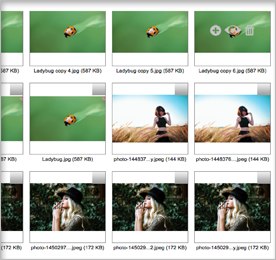
Organize Your Albums in a Snap
Duplicate Photo Cleaner is the easiest tool for organizing your albums. You can delete, rename and move duplicates in batches and compare images at a glance. You'll be able to recover lots of space in a click.
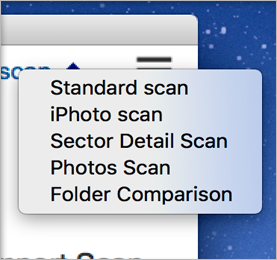
Flexible Settings & Scan Modes
Whether you're on PC or Mac, Duplicate Photo Cleaner has the scan mode to suit your needs. Find duplicates and similars on your HDD, SSD, SD card or in your Photos and Lightroom libraries. It's quick and easy.
Features include:
- Delete duplicates in bulk
- Supports all popular formats
- Accurate image comparison
- Advanced scan modes
- Fast and easy to use
Why Do You Need Duplicate Photo Cleaner?
Duplicate Photo Cleaner is the fastest and the most powerful app to find and remove duplicate and similar images. With its help, you'll be able to organize all your unsorted photos in a jiffy even if some are in RAW, PSD and other less common formats.
Duplicate Photo Cleaner is ideal for sorting through series of shots because it lets you compare photos of the same subject in Multi-Viewer, delete the images you don't like, and keep only the best photos.
The app is also great for comparing edited photos because it can pick up images with different dimensions and formats, different color saturation, pictures with frames and clip art, as well as heavily edited Photoshop and Lightroom photos.
Why waste precious disk space on low quality photos you don't need when you can remove them with Duplicate Photo Cleaner in just a couple of clicks!